<!DOCTYPE html>
	<html lang="vi" xmlns="http://www.w3.org/1999/xhtml" prefix="og: http://ogp.me/ns#">
	<head>
<title>HƯỚNG DẪN 4 BƯỚC KHAI THUẾ TRÊN ETAX MOBILE CHO HỘ KINH DOANH CHO THUÊ NHÀ</title>
<meta name="description" content="Vinaco.Work là nền tảng chuyên tư vấn và dịch vụ hỗ trợ doanh nghiệp - cung ứng các giải pháp doanh nghiệp và chuyển đổi số - đáp ứng hạ tầng quản trị doanh nghiệp">
<meta name="keywords" content="vinaco.work,  vietnam company co working">
<meta name="news_keywords" content="vinaco.work,  vietnam company co working">
<meta name="author" content="VINACO.WORK - CỔNG THÔNG TIN DỊCH VỤ DOANH NGHIỆP VIỆT NAM">
<meta name="copyright" content="VINACO.WORK - CỔNG THÔNG TIN DỊCH VỤ DOANH NGHIỆP VIỆT NAM [webmaster@vinaco.work]">
<meta name="robots" content="index, archive, follow, noodp">
<meta name="googlebot" content="index,archive,follow,noodp">
<meta name="msnbot" content="all,index,follow">
<meta name="generator" content="Vinathis:0907097567">
<meta name="viewport" content="width=device-width, initial-scale=1">
<meta name="google-adsense-account" content="ca-pub-1364316422639127">
<meta http-equiv="Content-Type" content="text/html; charset=utf-8">
<meta property="og:title" content="HƯỚNG DẪN 4 BƯỚC KHAI THUẾ TRÊN ETAX MOBILE CHO HỘ KINH DOANH CHO THUÊ NHÀ">
<meta property="og:type" content="website">
<meta property="og:description" content="Vinaco.Work là nền tảng chuyên tư vấn và dịch vụ hỗ trợ doanh nghiệp - cung ứng các giải pháp doanh nghiệp và chuyển đổi số - đáp ứng hạ tầng quản trị doanh nghiệp">
<meta property="og:site_name" content="VINACO.WORK - CỔNG THÔNG TIN DỊCH VỤ DOANH NGHIỆP VIỆT NAM">
<meta property="og:url" content="http://vinaco.work/tai-chinh-ke-toan/huong-dan-4-buoc-khai-thue-tren-etax-mobile-cho-ho-kinh-doanh-cho-thue-nha-167.html">
<link rel="shortcut icon" href="http://vinaco.work/uploads/icon.png">
<link rel="canonical" href="http://vinaco.work/tai-chinh-ke-toan/huong-dan-4-buoc-khai-thue-tren-etax-mobile-cho-ho-kinh-doanh-cho-thue-nha-167.html">
<link rel="alternate" href="http://vinaco.work/rss/" title="Tin Tức" type="application/rss+xml">
<link rel="alternate" href="http://vinaco.work/rss/tin-tuc-thi-truong/" title="Tin Tức - Tin Tức Thị Trường" type="application/rss+xml">
<link rel="alternate" href="http://vinaco.work/rss/giai-phap-doanh-nghiep/" title="Tin Tức - Giải Pháp Doanh Nghiệp" type="application/rss+xml">
<link rel="alternate" href="http://vinaco.work/rss/tai-chinh-ke-toan/" title="Tin Tức - Tài chính &amp; kế toán" type="application/rss+xml">
<link rel="alternate" href="http://vinaco.work/rss/nghien-cuu-phat-trien/" title="Tin Tức - Nghiên cứu &amp; phát triển" type="application/rss+xml">
<link rel="alternate" href="http://vinaco.work/rss/chuyen-doi-so/" title="Tin Tức - Chuyển Đổi Số" type="application/rss+xml">
<link rel="alternate" href="http://vinaco.work/rss/phap-ly-doanh-nghiep/" title="Tin Tức - Pháp Lý Doanh Nghiệp" type="application/rss+xml">
<link rel="alternate" href="http://vinaco.work/rss/dich-vu-khac/" title="Tin Tức - Dịch Vụ Khác" type="application/rss+xml">
<link rel="alternate" href="http://vinaco.work/rss/doi-tac-tuyen-dung/" title="Tin Tức - Đối Tác &amp; Tuyển Dụng" type="application/rss+xml">
<link rel="preload" as="script" href="http://vinaco.work/assets/js/jquery/jquery.min.js">
<link rel="preload" as="script" href="http://vinaco.work/assets/js/language/vi.js">
<link rel="preload" as="script" href="http://vinaco.work/assets/js/global.js">
<link rel="preload" as="script" href="http://vinaco.work/themes/default/js/news.js">
<link rel="preload" as="script" href="http://vinaco.work/themes/default/js/main.js">
<link rel="preload" as="script" href="http://vinaco.work/themes/default/js/bootstrap.min.js">
<link rel="StyleSheet" href="http://vinaco.work/assets/css/font-awesome.min.css">
<link rel="StyleSheet" href="http://vinaco.work/themes/default/css/bootstrap.min.css">
<link rel="StyleSheet" href="http://vinaco.work/themes/default/css/style.css">
<link rel="StyleSheet" href="http://vinaco.work/themes/default/css/style.responsive.css">
<link rel="StyleSheet" href="http://vinaco.work/themes/default/css/news.css">
<link rel="StyleSheet" href="http://vinaco.work/assets/css/default.vi.0.css">
<style>
	body{background: #fff;}
/* 1. Cấu hình vị trí khung chứa (Container) */
.nv-contact-sticky {
    position: fixed;
    left: 15px;      /* Cách lề trái */
    bottom: 80px;    /* Cách đáy */
    z-index: 999999; /* Luôn nổi lên trên */
    display: flex;
    flex-direction: column; /* Xếp dọc */
    gap: 15px;       /* Khoảng cách giữa 2 nút */
}

/* 2. Cấu hình chung cho 2 nút bấm */
.nv-contact-sticky a {
    display: flex;
    justify-content: center; /* Căn giữa ngang */
    align-items: center;     /* Căn giữa dọc */
    width: 50px;
    height: 50px;
    border-radius: 50%;      /* Bo tròn hoàn hảo */
    text-decoration: none;
    box-shadow: 0 4px 10px rgba(0,0,0,0.3); /* Đổ bóng nhẹ */
    position: relative;
    transition: transform 0.3s ease;
    color: #fff; /* Màu chữ/icon trắng */
}

/* Hiệu ứng phóng to khi di chuột */
.nv-contact-sticky a:hover {
    transform: scale(1.1);
}

/* 3. Thiết kế riêng cho nút Zalo (Hiển thị chữ) */
.btn-zalo {
    background: #0068ff; /* Màu xanh thương hiệu Zalo */
    font-family: Arial, sans-serif; /* Font chữ đơn giản, dễ đọc */
    font-weight: 900;    /* Chữ siêu đậm */
    font-size: 16px;     /* Kích thước chữ vừa vặn trong vòng tròn 50px */
    letter-spacing: -0.5px; /* Thu hẹp khoảng cách chữ xíu cho chặt chẽ */
}

/* 4. Thiết kế riêng cho nút Phone (Hiển thị Icon) */
.btn-phone {
    background: #43a047; /* Màu xanh lá cây */
    font-size: 24px;     /* Kích thước icon điện thoại */
}

/* 5. Hiệu ứng vòng tròn lan tỏa (Pulse Animation) */
.nv-contact-sticky a::before {
    content: '';
    position: absolute;
    width: 100%;
    height: 100%;
    border-radius: 50%;
    background: inherit; /* Lấy luôn màu nền của nút cha */
    opacity: 0.6;
    z-index: -1;         /* Nằm dưới nút */
    animation: pulse-animation 2s infinite;
}

/* Định nghĩa chuyển động rung */
@keyframes pulse-animation {
    0% { transform: scale(1); opacity: 0.6; }
    100% { transform: scale(1.6); opacity: 0; }
}

/* Trên mobile thì điều chỉnh vị trí chút cho gọn */
@media (max-width: 768px) {
    .nv-contact-sticky { left: 10px; bottom: 60px; }
}
</style>
	</head>
	<body>
<div id="print">
	<div id="hd_print">
		<h2 class="pull-left">VINACO.WORK - CỔNG THÔNG TIN DỊCH VỤ DOANH NGHIỆP VIỆT NAM</h2>
		<p class="pull-right"><a title="VINACO.WORK - CỔNG THÔNG TIN DỊCH VỤ DOANH NGHIỆP VIỆT NAM" href="http://vinaco.work/">http://vinaco.work</a></p>
	</div>
	<div class="clear"></div>
	<hr />
	<div id="content">
		<h1>HƯỚNG DẪN 4 BƯỚC KHAI THUẾ TRÊN ETAX MOBILE CHO HỘ KINH DOANH CHO THUÊ NHÀ</h1>
		<ul class="list-inline">
			<li>Thứ sáu - 12/12/2025 23:16</li>
			<li class="hidden-print txtrequired"><em class="fa fa-print">&nbsp;</em><a title="In ra" href="javascript:;" onclick="window.print()">In ra</a></li>
			<li class="hidden-print txtrequired"><em class="fa fa-power-off">&nbsp;</em><a title="Đóng cửa sổ này" href="javascript:;" onclick="window.close()">Đóng cửa sổ này</a></li>
		</ul>
		<div class="clear"></div>
		<div id="hometext">
			Hướng dẫn chi tiết 4 bước khai thuế trên eTax Mobile cho hộ kinh doanh cho thuê nhà theo quy định mới nhất 2026, giúp cá nhân kinh doanh chủ động quản lý thuế hiệu quả.
		</div>
				<div class="imghome">
			<img alt="Etax mobile" src="http://vinaco.work/uploads/news/2025_12/etax-mobile.png" width="460" class="img-thumbnail" />
		</div>
		<div class="clear"></div>
		<div id="bodytext" class="clearfix">
			<div style="text-align: justify;"><span style="font-size:medium"><span style="font-family:&#039;Times New Roman&#039;, serif"><span style="caret-color:rgb(0, 0, 0);"><span style="color:rgb(0, 0, 0);"><span style="font-style:normal"><span style="font-variant-caps:normal"><span style="font-weight:400"><span style="letter-spacing:normal"><span style="orphans:auto"><span style="text-transform:none"><span style="white-space:normal"><span style="widows:auto"><span style="word-spacing:0px"><span style="text-decoration:none"><span style="color:black">Hệ thống quản lý thuế tại Việt Nam đang trải qua một giai đoạn chuyển đổi số mạnh mẽ nhằm tối ưu hóa tính minh bạch và hiệu quả quản trị. Theo lộ trình mới nhất từ Bộ Tài chính, từ năm 2026, hình thức khoán thuế truyền thống sẽ chính thức bị xóa bỏ, yêu cầu 100% hộ kinh doanh phải chuyển sang hình thức kê khai thuế. Đây là một bước ngoặt lớn, đòi hỏi các hộ kinh doanh, đặc biệt là các cá nhân có hoạt động cho thuê bất động sản như nhà xưởng, văn phòng hay căn hộ, phải nhanh chóng thích nghi với các công cụ công nghệ. Để hỗ trợ người nộp thuế làm quen với quy trình này, Cục Thuế đã triển khai cổng trải nghiệm trên ứng dụng eTax Mobile, cho phép người dùng thực hành các thao tác trước khi áp dụng thực tế. Vinaco.work xin gửi tới quý khách hàng hướng dẫn chi tiết nhằm đảm bảo quá trình tuân thủ pháp lý diễn ra thuận lợi nhất.</span></span></span></span></span></span></span></span></span></span></span></span></span></span></span></div>

<h2 data-path-to-node="3" style="text-indent: 0px; -webkit-text-stroke-width: 0px; margin-top: 3px; text-align: justify;"><span style="font-size:13pt"><span style="break-after:avoid"><span style="font-family:&#039;Calibri Light&#039;, sans-serif"><span style="color:rgb(47, 84, 150);"><span style="font-weight:normal"><span style="font-style:normal"><span style="font-variant-caps:normal"><span style="letter-spacing:normal"><span style="orphans:auto"><span style="text-transform:none"><span style="white-space:normal"><span style="widows:auto"><span style="word-spacing:0px"><span style="text-decoration:none"><span style="caret-color:rgb(0, 0, 0);"><b><span style="font-family:&#039;Times New Roman&#039;, serif"><span style="color:black">Chuyển đổi số trong quản lý thuế và lộ trình xóa bỏ thuế khoán năm 2026</span></span></b></span></span></span></span></span></span></span></span></span></span></span></span></span></span></span></h2>

<div style="text-align: justify;"><span style="font-size:medium"><span style="font-family:&#039;Times New Roman&#039;, serif"><span style="color:rgb(0, 0, 0);"><span style="font-style:normal"><span style="font-variant-caps:normal"><span style="font-weight:400"><span style="letter-spacing:normal"><span style="orphans:auto"><span style="text-transform:none"><span style="white-space:normal"><span style="widows:auto"><span style="word-spacing:0px"><span style="text-decoration:none"><span style="caret-color:rgb(0, 0, 0);"><span style="color:black">Việc chuyển từ hình thức thuế khoán sang kê khai thuế không chỉ là thay đổi về phương pháp tính mà còn là sự thay đổi về tư duy quản trị doanh nghiệp và hộ kinh doanh. Thay vì nộp một mức thuế cố định hàng tháng dựa trên định mức của cơ quan thuế, cá nhân kinh doanh sẽ phải tự chịu trách nhiệm về số liệu doanh thu và chi phí thực tế. Điều này đòi hỏi người nộp thuế phải trang bị kỹ năng sử dụng các ứng dụng số như eTax Mobile để thực hiện nghĩa vụ một cách chính xác.</span></span></span></span></span></span></span></span></span></span></span></span></span></span></span><br  />
<span style="font-size:medium"><span style="font-family:&#039;Times New Roman&#039;, serif"><span style="color:rgb(0, 0, 0);"><span style="font-style:normal"><span style="font-variant-caps:normal"><span style="font-weight:400"><span style="letter-spacing:normal"><span style="orphans:auto"><span style="text-transform:none"><span style="white-space:normal"><span style="widows:auto"><span style="word-spacing:0px"><span style="text-decoration:none"><span style="caret-color:rgb(0, 0, 0);"><span style="color:black">Trong bối cảnh đó, các&nbsp;<b>giải pháp doanh nghiệp</b>&nbsp;toàn diện đang trở thành nhu cầu thiết yếu. Việc nắm vững quy trình kê khai điện tử không chỉ giúp giảm thiểu rủi ro pháp lý mà còn giúp cá nhân kinh doanh chủ động trong việc lập kế hoạch tài chính. Cổng trải nghiệm được tích hợp trên eTax Mobile là công cụ đắc lực để các chủ hộ kinh doanh làm quen với giao diện và các chỉ tiêu kê khai phức tạp mà không sợ mắc lỗi trong giai đoạn tập huấn.</span></span></span></span></span></span></span></span></span></span></span></span></span></span></span></div>

<h2 data-path-to-node="6" style="text-indent: 0px; -webkit-text-stroke-width: 0px; margin-top: 3px; text-align: justify;"><span style="font-size:13pt"><span style="break-after:avoid"><span style="font-family:&#039;Calibri Light&#039;, sans-serif"><span style="color:rgb(47, 84, 150);"><span style="font-weight:normal"><span style="font-style:normal"><span style="font-variant-caps:normal"><span style="letter-spacing:normal"><span style="orphans:auto"><span style="text-transform:none"><span style="white-space:normal"><span style="widows:auto"><span style="word-spacing:0px"><span style="text-decoration:none"><span style="caret-color:rgb(0, 0, 0);"><b><span style="font-family:&#039;Times New Roman&#039;, serif"><span style="color:black">Hướng dẫn chi tiết 4 bước khai thuế trên eTax Mobile cho hộ kinh doanh cho thuê nhà</span></span></b></span></span></span></span></span></span></span></span></span></span></span></span></span></span></span></h2>

<div style="text-align: justify;"><span style="font-size:medium"><span style="font-family:&#039;Times New Roman&#039;, serif"><span style="color:rgb(0, 0, 0);"><span style="font-style:normal"><span style="font-variant-caps:normal"><span style="font-weight:400"><span style="letter-spacing:normal"><span style="orphans:auto"><span style="text-transform:none"><span style="white-space:normal"><span style="widows:auto"><span style="word-spacing:0px"><span style="text-decoration:none"><span style="caret-color:rgb(0, 0, 0);"><span style="color:black">Để bắt đầu quá trình này, người nộp thuế cần đảm bảo ứng dụng eTax Mobile đã được cập nhật phiên bản mới nhất trên điện thoại thông minh. Tính năng trải nghiệm sẽ xuất hiện ngay tại màn hình chính, cho phép người dùng thực hiện đầy đủ các bước từ chọn tờ khai đến xác nhận nộp hồ sơ bằng mã OTP giả lập. Dưới đây là quy trình cụ thể đã được Cục Thuế TP. Hà Nội hướng dẫn.</span></span></span></span></span></span></span></span></span></span></span></span></span></span></span></div>

<h3 data-path-to-node="8" style="text-indent: 0px; -webkit-text-stroke-width: 0px; margin-top: 3px; text-align: justify;"><span style="font-size:12pt"><span style="break-after:avoid"><span style="font-family:&#039;Calibri Light&#039;, sans-serif"><span style="color:rgb(31, 55, 99);"><span style="font-weight:normal"><span style="font-style:normal"><span style="font-variant-caps:normal"><span style="letter-spacing:normal"><span style="orphans:auto"><span style="text-transform:none"><span style="white-space:normal"><span style="widows:auto"><span style="word-spacing:0px"><span style="text-decoration:none"><span style="caret-color:rgb(0, 0, 0);"><b><span style="font-family:&#039;Times New Roman&#039;, serif"><span style="color:black">Bước 1: Truy cập và lựa chọn chức năng trải nghiệm kê khai</span></span></b></span></span></span></span></span></span></span></span></span></span></span></span></span></span></span></h3>

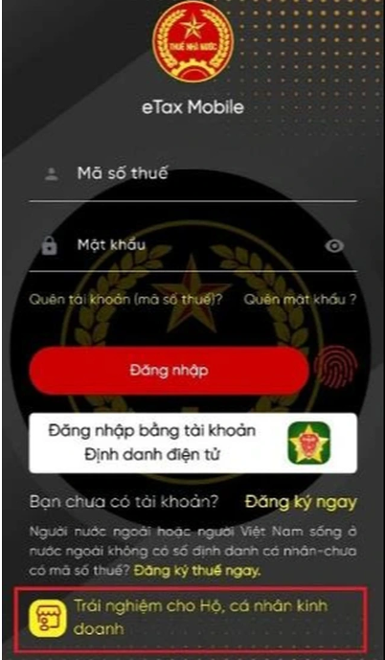
<div style="text-align: justify;"><span style="font-size:medium"><span style="font-family:&#039;Times New Roman&#039;, serif"><span style="color:rgb(0, 0, 0);"><span style="font-style:normal"><span style="font-variant-caps:normal"><span style="font-weight:400"><span style="letter-spacing:normal"><span style="orphans:auto"><span style="text-transform:none"><span style="white-space:normal"><span style="widows:auto"><span style="word-spacing:0px"><span style="text-decoration:none"><span style="caret-color:rgb(0, 0, 0);"><span style="color:black">Người nộp thuế tiến hành mở ứng dụng eTax Mobile và đăng nhập (nếu có tài khoản) hoặc chọn trực tiếp mục &quot;Trải nghiệm cho hộ, cá nhân kinh doanh&quot; ngay tại giao diện khởi động. Đây là khu vực dành riêng để người dùng thực hành các thao tác mà không làm ảnh hưởng đến dữ liệu thực tế trên hệ thống của Tổng cục Thuế. Tại màn hình &quot;Danh sách chức năng&quot;, người dùng cần tìm và nhấp chọn vào mục &quot;Khai thuế&quot;. Hệ thống lúc này sẽ điều hướng bạn đến giao diện thiết lập các thông tin cơ bản về loại hình kinh doanh và đối tượng tính thuế. Việc thực hành nhuần nhuyễn tại bước này giúp cá nhân kinh doanh nắm bắt được cấu trúc của ứng dụng, từ đó tự tin hơn khi thực hiện các dịch vụ kế toán thực tế cho cơ sở của mình.</span></span></span></span></span></span></span></span></span></span></span></span></span></span></span></div>

<h3 data-path-to-node="10" style="text-indent: 0px; -webkit-text-stroke-width: 0px; margin-top: 3px; text-align: justify;"><span style="font-size:12pt"><span style="break-after:avoid"><span style="font-family:&#039;Calibri Light&#039;, sans-serif"><span style="color:rgb(31, 55, 99);"><span style="font-weight:normal"><span style="font-style:normal"><span style="font-variant-caps:normal"><span style="letter-spacing:normal"><span style="orphans:auto"><span style="text-transform:none"><span style="white-space:normal"><span style="widows:auto"><span style="word-spacing:0px"><span style="text-decoration:none"><span style="caret-color:rgb(0, 0, 0);"><b><span style="font-family:&#039;Times New Roman&#039;, serif"><span style="color:black">Bước 2: Lựa chọn loại tờ khai và xác định cơ quan thuế quản lý</span></span></b></span></span></span></span></span></span></span></span></span></span></span></span></span></span></span></h3>

<div style="text-align: justify;"><span style="font-size:medium"><span style="font-family:&#039;Times New Roman&#039;, serif"><span style="color:rgb(0, 0, 0);"><span style="font-style:normal"><span style="font-variant-caps:normal"><span style="font-weight:400"><span style="letter-spacing:normal"><span style="orphans:auto"><span style="text-transform:none"><span style="white-space:normal"><span style="widows:auto"><span style="word-spacing:0px"><span style="text-decoration:none"><span style="caret-color:rgb(0, 0, 0);"><span style="color:black">Màn hình hệ thống sẽ xuất hiện các câu hỏi gợi ý để xác định loại tờ khai phù hợp. Trong trường hợp hộ kinh doanh không có hoạt động khai thác tài nguyên hoặc sản xuất hàng chịu thuế tiêu thụ đặc biệt, người dùng tích chọn &quot;Đúng&quot; để hiển thị danh sách tờ khai phổ thông và chọn &quot;Nộp hồ sơ&quot;. Điểm quan trọng nhất ở bước này là xác định đúng hoạt động kinh doanh. Bạn cần tích chọn vào ô &quot;Doanh thu từ hoạt động cho thuê bất động sản (cho thuê nhà xưởng, kho bãi, cửa hàng, mặt bằng)&quot; để hệ thống kích hoạt các mẫu biểu liên quan đến thuế nhà đất.</span></span></span></span></span></span></span></span></span></span></span></span></span></span></span><br  />
<span style="font-size:medium"><span style="font-family:&#039;Times New Roman&#039;, serif"><span style="color:rgb(0, 0, 0);"><span style="font-style:normal"><span style="font-variant-caps:normal"><span style="font-weight:400"><span style="letter-spacing:normal"><span style="orphans:auto"><span style="text-transform:none"><span style="white-space:normal"><span style="widows:auto"><span style="word-spacing:0px"><span style="text-decoration:none"><span style="caret-color:rgb(0, 0, 0);"><span style="color:black">Sau đó, hệ thống sẽ yêu cầu xác định cơ quan thuế. Nếu người nộp thuế chỉ có một bất động sản, hãy chọn &quot;Khai thuế tại cơ quan thuế quản lý nơi có bất động sản cho thuê&quot;. Ngược lại, nếu sở hữu nhiều địa điểm cho thuê tại các khu vực khác nhau, người dùng nên chọn &quot;Khai thuế cho nhiều bất động sản tại cơ quan thuế quản lý nơi cư trú&quot; để tập trung đầu mối quản lý. Người nộp thuế tiếp tục chọn thông tin về tỉnh/thành phố, quận/huyện và xã/phường để hệ thống tự động nhận diện cơ quan thuế tiếp nhận. Cuối cùng, căn cứ vào doanh thu thực tế, bạn chọn ngưỡng trên hoặc dưới 200 triệu đồng/năm để hệ thống áp dụng các quy định hỗ trợ phù hợp trước khi nhấn &quot;Tiếp tục&quot;.</span></span></span></span></span></span></span></span></span></span></span></span></span></span></span></div>

<h3 data-path-to-node="13" style="text-indent: 0px; -webkit-text-stroke-width: 0px; margin-top: 3px; text-align: justify;"><span style="font-size:12pt"><span style="break-after:avoid"><span style="font-family:&#039;Calibri Light&#039;, sans-serif"><span style="color:rgb(31, 55, 99);"><span style="font-weight:normal"><span style="font-style:normal"><span style="font-variant-caps:normal"><span style="letter-spacing:normal"><span style="orphans:auto"><span style="text-transform:none"><span style="white-space:normal"><span style="widows:auto"><span style="word-spacing:0px"><span style="text-decoration:none"><span style="caret-color:rgb(0, 0, 0);"><b><span style="font-family:&#039;Times New Roman&#039;, serif"><span style="color:black">Bước 3: Cập nhật thông tin địa điểm kinh doanh và xác định doanh thu</span></span></b></span></span></span></span></span></span></span></span></span></span></span></span></span></span></span></h3>

<div style="text-align: justify;"><span style="font-size:medium"><span style="font-family:&#039;Times New Roman&#039;, serif"><span style="color:rgb(0, 0, 0);"><span style="font-style:normal"><span style="font-variant-caps:normal"><span style="font-weight:400"><span style="letter-spacing:normal"><span style="orphans:auto"><span style="text-transform:none"><span style="white-space:normal"><span style="widows:auto"><span style="word-spacing:0px"><span style="text-decoration:none"><span style="caret-color:rgb(0, 0, 0);"><span style="color:black">Tại giao diện này, người nộp thuế cần điền chi tiết địa chỉ của bất động sản đang cho thuê. Đối với những cá nhân kinh doanh chuyên nghiệp có nhiều mặt bằng, tính năng &quot;Thêm địa điểm kinh doanh&quot; cho phép kê khai gộp trong cùng một tờ khai, giúp tiết kiệm thời gian và công sức. Sau khi hoàn tất thông tin địa điểm, người dùng sẽ chuyển sang phần quan trọng nhất là xác định doanh thu tính thuế.</span></span></span></span></span></span></span></span></span></span></span></span></span></span></span><br  />
<span style="font-size:medium"><span style="font-family:&#039;Times New Roman&#039;, serif"><span style="color:rgb(0, 0, 0);"><span style="font-style:normal"><span style="font-variant-caps:normal"><span style="font-weight:400"><span style="letter-spacing:normal"><span style="orphans:auto"><span style="text-transform:none"><span style="white-space:normal"><span style="widows:auto"><span style="word-spacing:0px"><span style="text-decoration:none"><span style="caret-color:rgb(0, 0, 0);"><span style="color:black">Người nộp thuế cần nhập số liệu vào chỉ tiêu &quot;Doanh thu&quot; nếu số tiền đạt ngưỡng chịu thuế theo quy định pháp luật hiện hành. Trong trường hợp doanh thu thuộc ngưỡng không chịu thuế giá trị gia tăng, hãy điền vào ô tương ứng để đảm bảo quyền lợi. Điểm ưu việt của eTax Mobile là khả năng tự động tính toán số thuế giá trị gia tăng và thuế thu nhập cá nhân dựa trên các mức thuế suất hiện hành. Điều này giúp giảm thiểu sai sót tính toán thủ công, một trong những lỗi phổ biến thường gặp khi thực hiện các thủ tục thuế truyền thống.</span></span></span></span></span></span></span></span></span></span></span></span></span></span></span></div>

<h3 data-path-to-node="16" style="text-indent: 0px; -webkit-text-stroke-width: 0px; margin-top: 3px; text-align: justify;"><span style="font-size:12pt"><span style="break-after:avoid"><span style="font-family:&#039;Calibri Light&#039;, sans-serif"><span style="color:rgb(31, 55, 99);"><span style="font-weight:normal"><span style="font-style:normal"><span style="font-variant-caps:normal"><span style="letter-spacing:normal"><span style="orphans:auto"><span style="text-transform:none"><span style="white-space:normal"><span style="widows:auto"><span style="word-spacing:0px"><span style="text-decoration:none"><span style="caret-color:rgb(0, 0, 0);"><b><span style="font-family:&#039;Times New Roman&#039;, serif"><span style="color:black">Bước 4: Kiểm tra thông tin và hoàn tất nộp tờ khai điện tử</span></span></b></span></span></span></span></span></span></span></span></span></span></span></span></span></span></span></h3>

<div style="text-align: justify;"><span style="font-size:medium"><span style="font-family:&#039;Times New Roman&#039;, serif"><span style="color:rgb(0, 0, 0);"><span style="font-style:normal"><span style="font-variant-caps:normal"><span style="font-weight:400"><span style="letter-spacing:normal"><span style="orphans:auto"><span style="text-transform:none"><span style="white-space:normal"><span style="widows:auto"><span style="word-spacing:0px"><span style="text-decoration:none"><span style="caret-color:rgb(0, 0, 0);"><span style="color:black">Ở bước cuối cùng, hệ thống sẽ hiển thị bản xem trước của tờ khai PDF với đầy đủ các chỉ tiêu đã kê khai. Người nộp thuế có trách nhiệm rà soát lại toàn bộ thông tin từ mã số thuế, họ tên đến số tiền thuế phải nộp. Ứng dụng cung cấp tùy chọn &quot;Tải về&quot; hoặc &quot;Chia sẻ&quot; để lưu trữ hồ sơ cho mục đích kiểm soát nội bộ. Sau khi đảm bảo tính chính xác, người dùng nhấn &quot;Nộp tờ khai&quot;. Vì đây là cổng trải nghiệm, hệ thống sẽ tự động cấp một mã OTP giả lập. Người dùng chỉ cần nhập mã này và nhấn &quot;Xác nhận&quot; để hoàn tất quy trình. Việc thực hiện đầy đủ 4 bước này không chỉ giúp hoàn thành nghĩa vụ mà còn là cách để người dân nâng cao nhận thức về chuyển đổi số trong quản lý tài chính cá nhân.</span></span></span></span></span></span></span></span></span></span></span></span></span></span></span></div>

<h2 data-path-to-node="18" style="text-indent: 0px; -webkit-text-stroke-width: 0px; margin-top: 3px; text-align: justify;"><span style="font-size:13pt"><span style="break-after:avoid"><span style="font-family:&#039;Calibri Light&#039;, sans-serif"><span style="color:rgb(47, 84, 150);"><span style="font-weight:normal"><span style="font-style:normal"><span style="font-variant-caps:normal"><span style="letter-spacing:normal"><span style="orphans:auto"><span style="text-transform:none"><span style="white-space:normal"><span style="widows:auto"><span style="word-spacing:0px"><span style="text-decoration:none"><span style="caret-color:rgb(0, 0, 0);"><b><span style="font-family:&#039;Times New Roman&#039;, serif"><span style="color:black">Vai trò của Vinaco.work trong việc hỗ trợ hộ kinh doanh thích ứng quy định mới</span></span></b></span></span></span></span></span></span></span></span></span></span></span></span></span></span></span></h2>

<div style="text-align: justify;"><span style="font-size:medium"><span style="font-family:&#039;Times New Roman&#039;, serif"><span style="color:rgb(0, 0, 0);"><span style="font-style:normal"><span style="font-variant-caps:normal"><span style="font-weight:400"><span style="letter-spacing:normal"><span style="orphans:auto"><span style="text-transform:none"><span style="white-space:normal"><span style="widows:auto"><span style="word-spacing:0px"><span style="text-decoration:none"><span style="caret-color:rgb(0, 0, 0);"><span style="color:black">Việc chuyển đổi từ thuế khoán sang kê khai có thể gây ra nhiều lúng túng cho các hộ kinh doanh trong giai đoạn đầu. Để đảm bảo mọi thủ tục pháp lý được thực hiện chính xác và tối ưu, việc tìm kiếm một đơn vị tư vấn chuyên nghiệp là vô cùng cần thiết. Vinaco.work tự hào là cổng thông tin dịch vụ doanh nghiệp hàng đầu, cung cấp các giải pháp toàn diện từ&nbsp;<b>thành lập công ty</b>, thay đổi đăng ký kinh doanh đến các&nbsp;<b>dịch vụ kế toán</b>&nbsp;chuyên sâu.</span></span></span></span></span></span></span></span></span></span></span></span></span></span></span><br  />
<span style="font-size:medium"><span style="font-family:&#039;Times New Roman&#039;, serif"><span style="color:rgb(0, 0, 0);"><span style="font-style:normal"><span style="font-variant-caps:normal"><span style="font-weight:400"><span style="letter-spacing:normal"><span style="orphans:auto"><span style="text-transform:none"><span style="white-space:normal"><span style="widows:auto"><span style="word-spacing:0px"><span style="text-decoration:none"><span style="caret-color:rgb(0, 0, 0);"><span style="color:black">Chúng tôi hiểu rằng, mỗi sai sót trong kê khai thuế không chỉ dẫn đến các hình phạt hành chính mà còn ảnh hưởng đến uy tín kinh doanh của cá nhân và doanh nghiệp. Với đội ngũ chuyên gia giàu kinh nghiệm cam kết đồng hành cùng các hộ kinh doanh trong việc cập nhật các quy định pháp luật mới nhất, hướng dẫn thao tác trên các nền tảng số và xây dựng hệ thống quản trị tài chính minh bạch, bền vững.</span></span></span></span></span></span></span></span></span></span></span></span></span></span></span></div>

<h2 data-path-to-node="21" style="text-indent: 0px; -webkit-text-stroke-width: 0px; margin-top: 3px; text-align: justify;"><span style="font-size:13pt"><span style="break-after:avoid"><span style="font-family:&#039;Calibri Light&#039;, sans-serif"><span style="color:rgb(47, 84, 150);"><span style="font-weight:normal"><span style="font-style:normal"><span style="font-variant-caps:normal"><span style="letter-spacing:normal"><span style="orphans:auto"><span style="text-transform:none"><span style="white-space:normal"><span style="widows:auto"><span style="word-spacing:0px"><span style="text-decoration:none"><span style="caret-color:rgb(0, 0, 0);"><b><span style="font-family:&#039;Times New Roman&#039;, serif"><span style="color:black">Kết luận&nbsp;</span></span></b></span></span></span></span></span></span></span></span></span></span></span></span></span></span></span></h2>

<div style="text-align: justify;"><span style="font-size:medium"><span style="font-family:&#039;Times New Roman&#039;, serif"><span style="color:rgb(0, 0, 0);"><span style="font-style:normal"><span style="font-variant-caps:normal"><span style="font-weight:400"><span style="letter-spacing:normal"><span style="orphans:auto"><span style="text-transform:none"><span style="white-space:normal"><span style="widows:auto"><span style="word-spacing:0px"><span style="text-decoration:none"><span style="caret-color:rgb(0, 0, 0);"><b><span style="color:black">Lộ trình xóa bỏ thuế khoán vào năm 2026 là một bước đi tất yếu trong quá trình hiện đại hóa nền kinh tế Việt Nam. Việc chủ động thực hành trên cổng trải nghiệm eTax Mobile ngay từ bây giờ sẽ giúp các hộ kinh doanh cho thuê nhà tránh được những bỡ ngỡ và sai sót khi quy định chính thức có hiệu lực. Sự minh bạch trong kê khai thuế không chỉ là nghĩa vụ mà còn là tấm thẻ thông hành giúp các hộ kinh doanh dễ dàng tiếp cận các nguồn lực tài chính và mở rộng quy mô trong tương lai.</span></b></span></span></span></span></span></span></span></span></span></span></span></span></span></span><br  />
<span style="font-size:medium"><span style="font-family:&#039;Times New Roman&#039;, serif"><span style="color:rgb(0, 0, 0);"><span style="font-style:normal"><span style="font-variant-caps:normal"><span style="font-weight:400"><span style="letter-spacing:normal"><span style="orphans:auto"><span style="text-transform:none"><span style="white-space:normal"><span style="widows:auto"><span style="word-spacing:0px"><span style="text-decoration:none"><span style="caret-color:rgb(0, 0, 0);"><span style="color:black">Nếu bạn còn gặp khó khăn trong quá trình sử dụng ứng dụng hoặc cần tư vấn sâu hơn về các vấn đề&nbsp;tài chính - kế toán, hãy liên hệ ngay với chúng tôi. Vinaco.work luôn sẵn sàng hỗ trợ bạn tối ưu hóa các quy trình quản lý và đảm bảo tuân thủ mọi quy định pháp luật một cách hiệu quả nhất.</span></span></span></span></span></span></span></span></span></span></span></span></span></span></span></div>
		</div>
	</div>
	<div id="footer" class="clearfix">
		<div id="url">
			<strong>URL của bản tin này: </strong><a href="http://vinaco.work/tai-chinh-ke-toan/huong-dan-4-buoc-khai-thue-tren-etax-mobile-cho-ho-kinh-doanh-cho-thue-nha-167.html" title="HƯỚNG DẪN 4 BƯỚC KHAI THUẾ TRÊN ETAX MOBILE CHO HỘ KINH DOANH CHO THUÊ NHÀ">http://vinaco.work/tai-chinh-ke-toan/huong-dan-4-buoc-khai-thue-tren-etax-mobile-cho-ho-kinh-doanh-cho-thue-nha-167.html</a>

		</div>
		<div class="clear"></div>
		<div class="copyright">
			&copy; VINACO.WORK - CỔNG THÔNG TIN DỊCH VỤ DOANH NGHIỆP VIỆT NAM
		</div>
		<div id="contact">
			<a href="mailto:webmaster@vinaco.work">webmaster@vinaco.work</a>
		</div>
	</div>
</div>
        <div id="timeoutsess" class="chromeframe">
            Bạn đã không sử dụng Site, <a onclick="timeoutsesscancel();" href="http://vinaco.work/#">Bấm vào đây để duy trì trạng thái đăng nhập</a>. Thời gian chờ: <span id="secField"> 60 </span> giây
        </div>
        <div id="openidResult" class="nv-alert" style="display:none"></div>
        <div id="openidBt" data-result="" data-redirect=""></div>
<div class="nv-contact-sticky">
    <a href="tel:0918300212" class="btn-phone" title="Gọi ngay: 0918.300.212">
        <i class="fa fa-phone" aria-hidden="true"></i>
    </a>

    <a href="https://zalo.me/0918300212" target="_blank" class="btn-zalo" title="Chat Zalo">
        Zalo
    </a>
</div>
<script src="http://vinaco.work/assets/js/jquery/jquery.min.js"></script>
<script>var nv_base_siteurl="/",nv_lang_data="vi",nv_lang_interface="vi",nv_name_variable="nv",nv_fc_variable="op",nv_lang_variable="language",nv_module_name="news",nv_func_name="savefile",nv_is_user=0, nv_my_ofs=7,nv_my_abbr="ICT",nv_cookie_prefix="nv4",nv_check_pass_mstime=1738000,nv_area_admin=0,nv_safemode=0,theme_responsive=1,nv_is_recaptcha=0;</script>
<script src="http://vinaco.work/assets/js/language/vi.js"></script>
<script src="http://vinaco.work/assets/js/global.js"></script>
<script src="http://vinaco.work/themes/default/js/news.js"></script>
<script src="http://vinaco.work/themes/default/js/main.js"></script>
<script src="http://vinaco.work/themes/default/js/bootstrap.min.js"></script>
</body>
</html>